Free · Windows · English & French

Your ADHD brain isn't lazy.

It just never got a starter. Nox is a tiny desktop buddy that talks to you first, breaks your task into tiny steps, and gently brings you back when you drift.

Built for ADHD first. Works for anyone who starts everything and finishes nothing.
✅ Free⚡ Ready in 1 minute🔐 Your data stays on your PC

Sound familiar?

You open the doc to "just start."

One notification.

You're deep in YouTube. The doc is still blank.

You know exactly what to do. You just can't make yourself start. And every app waits for you to make the first move.

Nox makes the first move for you.

In 2 minutes

See Nox in action

Filmed for real, nothing staged: the onboarding, a task started in Google Docs, a detour to YouTube that Nox notices, and the step that levels you up.

The video is coming very soon

Meanwhile, download Nox and try it in demo mode, no key needed.

How it works

Three steps. No setup marathon.

Say what you need to do

Out loud or typed, the way it comes to you: "I need to write my report."

Nox breaks it down

Into tiny steps of 2 to 10 minutes. You only see the next one, and a timer ring starts around Nox.

You just do the next step

Nox stays with you, celebrates each step, and gives you the next one. No guilt, no streak to lose.

Features

Like a friend sitting next to you. One who never judges.

🎙

It talks to you first

Real-time voice: talk to it like a friend, and interrupt it anytime. Or type, if you prefer.

🫶

It brings you back, gently

Drifting to YouTube or social media? A kind nudge, only if you allowed it.

🔖

"You were at…"

Step away for a while: Nox saves your spot and hands it back when you return, in 5 seconds.

☕

It protects your breaks

Hyperfocused for too long? Nox suggests a break, and keeps your place.

🧠

It remembers you

What blocks you, when your energy peaks, what helps. Everything stays on your PC, deletable in one click.

🏆

Game mode

XP for every step, 8 ranks, 8 skills to unlock. Progress you can see, never a streak you can lose.

📊

A clear dashboard

Your current step, checked-off steps, focus minutes over 7 days, and your task history.

🤏

As big or as discreet as you like

Small, medium or large. Hide it next to the clock, bring it back with Ctrl+Alt+N.

🌍

English or French

Nox follows your Windows language, and you can switch anytime. It talks and listens in your language.

📝

Quick notes

"Nox, note that I need to call Sam." Your notes land on sticky cards in the dashboard, and Nox reads them back when you ask.

🧰

The right app, at the right time

A report? Nox offers to open Word, or Google Docs if you say so. Coding? VS Code. A presentation? PowerPoint or Google Slides. Not installed? It opens the web version.

🙈

It has feelings

Tell it it's cute, it blushes. Say thanks, its eyes turn into hearts. Say you're exhausted, it gets it and offers a break.
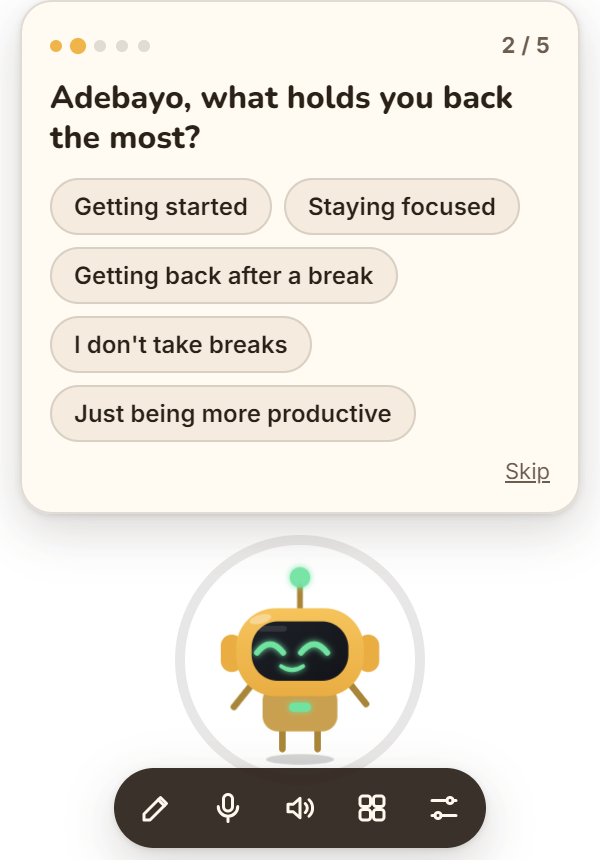
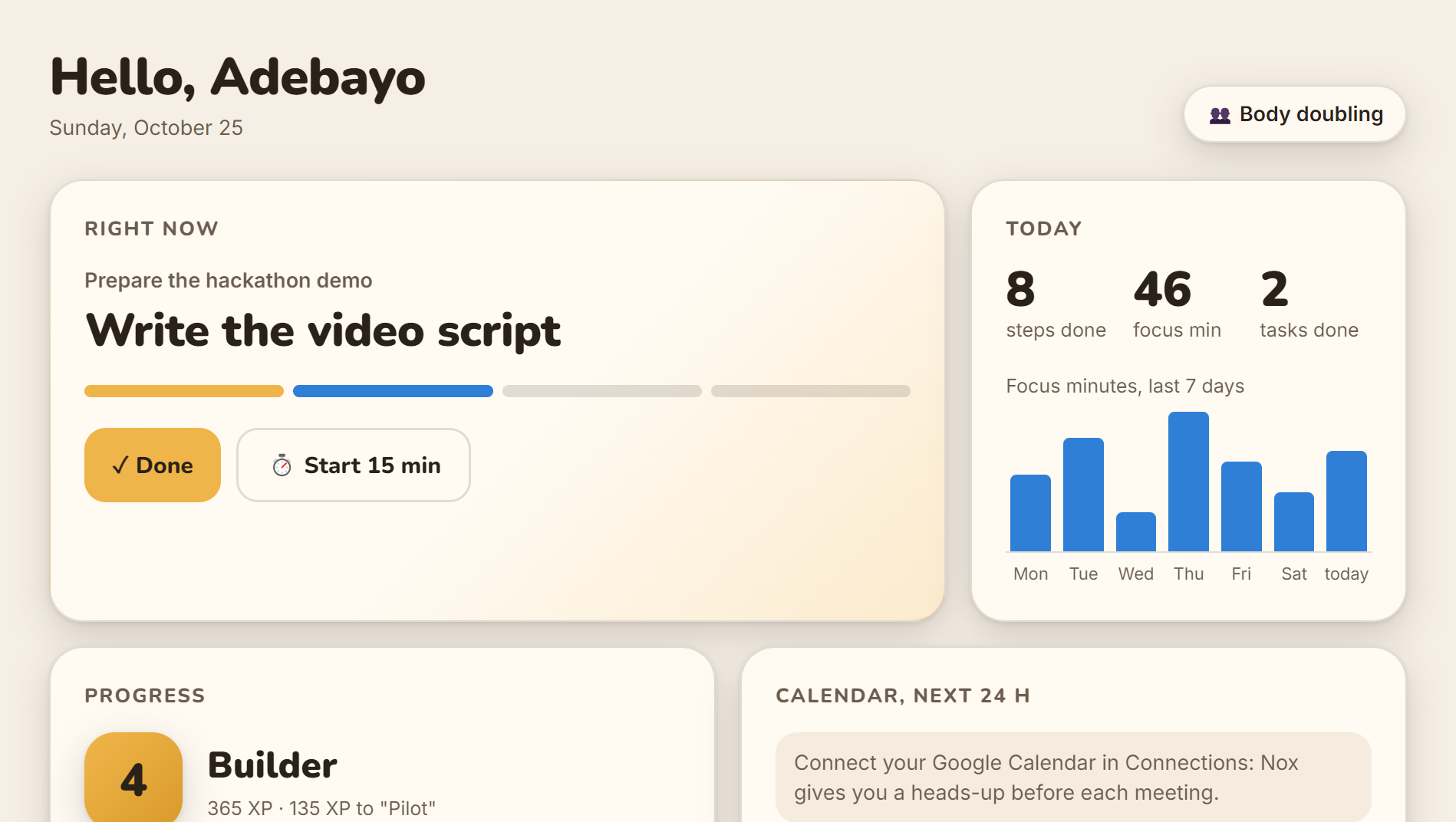
Nox onboarding: one question at a time with big answer buttons Nox dashboard: current step, focus minutes, progress and calendar

Connections

It looks after your whole day.

📅

Google Calendar

A heads-up 60 and 30 minutes before a meeting, an offer to get ready, and a quick review of your day every morning.

📬

Gmail

Nox spots important emails and offers to read them to you. Tell it "let me know if the tax office writes": it watches for it.

📱

Telegram

Scan a QR code: when you're away from your PC, Nox pings you on your phone. You can write to it too.

Grounded in research

5 questions. Under a minute. Then the right method for you.

The onboarding asks what blocks you, when you have energy and how long you can focus. Nox then picks the method that fits you. Change it anytime.

⏱️ 5-minute rule · to get started 🍅 Pomodoro · 25/5 👥 Body doubling · Nox stays with you 🔀 If… then… · to get back on track 📦 Time-boxing · against hyperfocus 🐸 Eat the frog · in the morning ⚡ 2-minute rule

Help at the moment of action

Russell Barkley's model: ADHD is a problem of doing, not knowing. So Nox lives where you work, and makes time visible.

Break tasks down

The core of Safren's cognitive behavioral therapy for adult ADHD, tested in a randomized controlled trial.

"If… then…" plans

Gollwitzer's implementation intentions: a clear effect on reaching goals in a meta-analysis of 94 tests.

Details and sources: the research summary.

Install

Installed in one double-click.

Download the installer

The file Nox.Setup.1.4.0.exe (about 80 MB) is on the releases page.

Download the latest version

Double-click it

Nox installs itself, launches, and will start with Windows. If Windows says "Windows protected your PC", click More info then Run anyway: the installer simply isn't signed yet.

Answer Nox

It lands at the bottom right of your screen and introduces itself. Pick your language, paste your OpenAI key for its real voice (encrypted on your PC) or choose Try without a key, then 5 quick questions.

Connect your tools (optional)

In the dashboard, Connections card: your Google Calendar (secret iCal address), Gmail (app password) and Telegram (QR code).

For developers: run from source
git clone https://github.com/adebayo-moutalabi/nox.git
cd nox
npm install
npm start            # NOX_FAKE_AI=1 for the demo brain, no key
npm test             # the whole journey on the real app
npm run dist         # builds the installer in dist/

FAQ

Your questions, answered.

Is Nox really free?

Yes. Nox is free and open source. Its real-time voice uses your own OpenAI key, so you pay OpenAI directly for what you use. Demo mode works without any key, for free.

Do I need an OpenAI key?

Not to try it: choose "Try without a key". For the natural real-time voice, create a key on platform.openai.com (API keys page) and paste it during onboarding or in the dashboard. It stays encrypted on your PC.

Where does my data go?

Your profile, memories, tasks and stats stay in a file on your PC. Your keys and passwords are encrypted by Windows. What you say to Nox is sent to OpenAI to generate its replies. Nox only looks at the active window title if you say yes.

I don't have ADHD. Is it for me?

Yes. Nox was designed for ADHD first, but it helps anyone who struggles to start, gets interrupted all the time, or loses the thread after a break.

Does Nox replace treatment or a professional?

No. Nox is a productivity tool, not a medical device. If ADHD affects your daily life, talk to a doctor or a specialist.

Why does Windows say the app isn't signed?

Signing an installer requires a paid certificate, which this first version doesn't have yet. Click "More info" then "Run anyway". The code is open source, so anyone can check what it does.

Does it work on Mac or Linux?

Not yet: Nox is Windows-only for now (Windows 10 and 11, 64-bit). A Mac version and a web version are on the roadmap.

How do I hide Nox or change its size?

Press Ctrl+Alt+N, or click the Nox icon next to the clock. Size (small, medium, large) is in Settings or in the icon's right-click menu.

How do I update Nox?

Download the latest installer and run it. Your profile, memories and history are kept.

Quality

Tested end to end, on the real app.

Automated tests launch Nox in a fresh folder, go through the whole journey like a real user, in English and in French, then relaunch it to check it remembers.

52checks, all green

Privacy

Nothing is watched without your consent.

🔐

Your data stays with you

Profile, memories and history live in a file on your PC. Keys and passwords are encrypted by Windows.

👀

Explicit permission

Nox only looks at the open app if you say yes, and only at its title.

🌙

Rest mode

One click, and Nox sleeps and stays quiet.

Vision · This is just the beginning

Today, ADHD. Tomorrow, everyone the computer leaves behind.

Nox makes the first move for you. That's what people with ADHD need, and it's also what anyone needs in front of a long form, a screen they can barely read, or a computer they never learned to use.

📄

Paperwork, made easy

"Help me fill this in." Nox explains each field in plain words and fills the form with you. You check it and you hit send, never Nox.

👁

For people with low vision

Everything by voice. Nox reads and describes the screen, with huge text and high contrast when you need it.

🧓

For older people

A simple mode, one step at a time ("the blue button, top right"), endless patience, and a warning when an email looks like a scam.

📱

Everywhere you are

On your phone, in Chrome, on Mac. Connected to your calendar and your tools through MCP.

🔑

Zero setup

No key to paste: one download, and Nox is ready, for everyone.

🫶

Always your call

Nox prepares, explains and guides. Nothing final (sending, paying, signing) ever happens without your yes.

Ready to finally start?

Free, open source, and ready in one minute.

Download Nox